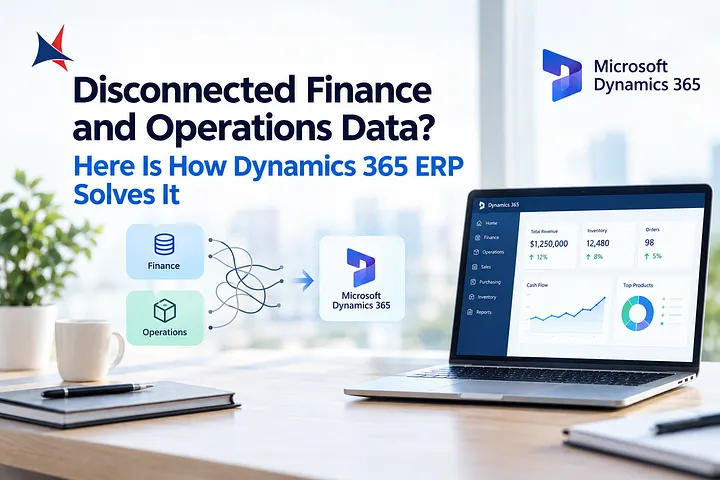
When finance, sales, inventory, and operations teams rely on separate systems, even simple business questions can take hours to answer. Finance may report one revenue figure while operations work with different inventory numbers. Employees spend time reconciling spreadsheets instead of identifying problems and planning improvements.
An enterprise resource planning (ERP) system can help bring these processes together. Microsoft Dynamics 365 connects business applications and data so teams can work from more consistent information. With a well-planned Dynamics 365 ERP implementation, your business can improve reporting, reduce repetitive data entry, and make decisions with greater confidence.
Why Disconnected Business Data Creates Problems
Separate systems often develop as a company grows. Finance adopts accounting software, operations use inventory tools, and sales teams maintain their own customer records. Each system may work reasonably well on its own, but the gaps between them create extra work.
For example, a sales team might confirm an order without seeing a recent inventory change. The warehouse then discovers a shortage, while finance struggles to determine the order’s current value and expected delivery costs. Employees must contact other departments or compare spreadsheets to establish what happened.
These gaps can lead to delayed reports, duplicate records, inconsistent figures, and missed opportunities. They also make it harder for managers to identify the source of a problem quickly.
How Microsoft Dynamics 365 Connects Finance and Operations
Microsoft Dynamics 365 offers business applications that support financial management, supply chain operations, sales, customer service, and other processes. Organizations can select applications that match their requirements and connect relevant workflows.
Dynamics 365 Finance supports areas such as general ledger, accounts payable, accounts receivable, budgeting, and financial reporting. Dynamics 365 Supply Chain Management supports processes such as procurement, inventory, warehouse management, production, and order fulfillment.
When these applications are configured and integrated appropriately, authorized teams can access relevant information without depending entirely on manually maintained spreadsheets. Data flows between connected processes according to the system configuration, business rules, and integration design.
A completed transaction can then support related activities across departments. For example, a purchase order may inform procurement and receiving activities, while the associated financial entries support accounts payable and reporting.
Five Ways ERP Integration Improves Daily Operations
1. More Consistent Financial Reporting
Finance teams often lose time collecting figures from different departments and checking whether totals match. Connected ERP processes can reduce manual reconciliation by recording transactions through defined workflows.
With suitable configuration, reporting tools and dashboards can help finance leaders review expenses, receivables, cash positions, and business performance. Teams should still establish clear accounting rules and reporting controls because connected software does not automatically correct inaccurate source data.
2. Better Inventory Visibility
Inventory discrepancies affect customer commitments, purchasing decisions, and working capital. When warehouse activity and inventory records are disconnected, employees may not know whether a product is available, reserved, in transit, or awaiting receipt.
Dynamics 365 Supply Chain Management can support inventory tracking across configured locations and processes. Businesses can use this information to review stock levels, monitor movements, and make replenishment decisions based on current records.
3. Fewer Repetitive Manual Tasks
Entering the same customer, supplier, order, or transaction details into multiple systems creates opportunities for mistakes. It also consumes time that employees could spend on exception handling and analysis.
A well-designed Dynamics 365 ERP implementation can reduce repeated entry through connected workflows, appropriate integrations, and automated business rules. Before automating a task, document how it works today and identify unnecessary approvals, duplicate steps, or inconsistent data requirements.
4. Clearer Coordination Between Departments
Finance and operations often measure success differently. Finance may focus on cost control and cash flow, while operations prioritize delivery schedules, inventory availability, and production requirements.
Shared business information helps teams understand how their decisions affect other departments. Purchasing teams, for instance, can consider budget availability alongside supplier lead times and stock requirements. Managers can also investigate operational changes that affect margins or fulfillment costs.
5. More Useful Business Analysis
Disconnected data limits the questions leaders can answer. If revenue, purchasing, inventory, and operating expenses sit in separate systems, creating a reliable performance report may require several manual steps.
Connected applications and reporting tools can provide a more consistent foundation for analysis. Businesses can use Microsoft Power BI or supported Dynamics 365 reporting capabilities to examine trends, compare performance, and identify areas that need attention. The value depends on data quality, reporting design, and appropriate user access.
Planning a Successful Dynamics 365 ERP Implementation
Software alone will not solve every data problem. Implementation requires clear business goals, reliable information, and agreement on how processes should work across departments.
Start by mapping the movement of information from its source to its final use. Identify where employees re-enter data, which systems contain duplicate records, and where reporting delays occur. Prioritize the problems that create the greatest operational or financial impact.
Next, define a realistic implementation scope. Decide which departments and applications should be included in the initial phase, which systems must remain connected, and which reports are essential at launch.
Data migration deserves particular attention. Review customer and supplier records, chart-of-accounts structures, inventory data, and open transactions before transferring information. Remove duplicates where appropriate, agree on data ownership, and validate migrated records against the original systems.
Testing should cover complete business scenarios rather than isolated screens. For example, test an order from entry through fulfillment, invoicing, and financial posting where those processes fall within the selected solution. Train users on their actual responsibilities, and provide a clear process for reporting issues after launch.
How Cambay Solutions Can Support ERP Modernization
Choosing the right implementation approach involves more than selecting software. Your business needs a clear view of its existing processes, integration requirements, reporting goals, and plans for future growth.
Cambay Solutions provides Microsoft business application services, including Dynamics 365-related implementation and consulting support. Businesses evaluating ERP modernization can explore its Dynamics 365 Finance and Supply Chain Management services to understand how financial and operational processes may be connected.
Before selecting an implementation partner, ask how the team handles data migration, integrations, testing, user training, and post-launch support. Request a defined scope, project milestones, responsibilities, and acceptance criteria. These details help you evaluate whether the proposed solution addresses your specific data challenges.
Frequently Asked Questions
What is Dynamics 365 ERP implementation?
It is the process of planning, configuring, testing, and deploying relevant Microsoft Dynamics 365 ERP applications to support business processes such as financial management, purchasing, inventory, and reporting.
Can Dynamics 365 connect finance and operations data?
Yes. Relevant Dynamics 365 applications can share information through supported integrations and configured workflows.
How does ERP integration reduce manual work?
ERP integration can reduce repeated data entry, support consistent transaction processing, and make information available across connected workflows.
How long does a Dynamics 365 ERP implementation take?
The timeline depends on business size, process complexity, data quality, integrations, customization, and the number of departments involved.
What should you prepare before implementation?
Document current workflows, identify critical reports, review data quality, confirm integration requirements, assign process owners, and define measurable success criteria.
Build a More Connected Business
Disconnected systems make it difficult to understand performance across finance and operations. Microsoft Dynamics 365 can help address these gaps by connecting relevant business processes, improving access to information, and reducing reliance on manual reconciliation.
A successful Dynamics 365 ERP implementation starts with clear priorities, dependable data, and practical process design. By preparing carefully and involving the right teams, you can build a stronger foundation for reporting, operational coordination, and informed business decisions.